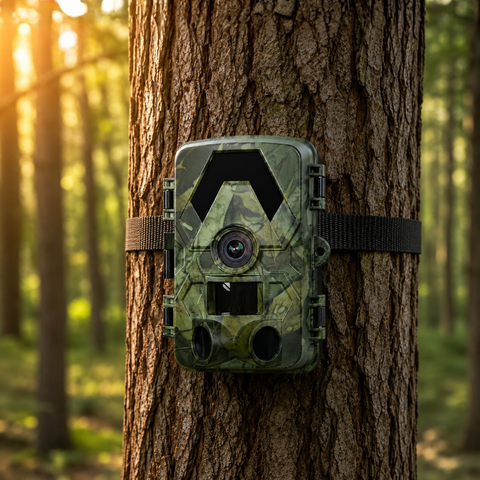

When a property sits far from where you actually live, checking on it means a drive, a ferry or a long walk, and by the time you arrive anything worth seeing has already happened. A 4G trail camera closes that gap: it captures motion on-site and sends the photos straight to your phone over the cellular network, so you can keep an eye on a remote cabin, plot of woodland or outbuilding from anywhere. This guide explains how these cameras work, what you need to run one, and how to place it so it earns its keep.
Why 4G is the right choice for a remote location
Trail cameras generally come in three flavours, and the distance to your property is what decides between them. An offline SD camera stores everything to a memory card, which is perfect when you visit regularly but useless if you want live updates. A WiFi camera lets you pull images to a phone, but only when you are standing within range of the camera, so it suits a garden or yard rather than a distant plot. A 4G camera is the only type that reaches you when you are nowhere near it, because it uses the mobile network instead of your presence.
For a genuinely remote property, that difference is everything. You find out about a visitor, a delivery, a fallen tree or an unexpected vehicle within moments, not on your next visit weeks later. If the location also lacks mains power, the 4G Solar Trail Camera 4K adds an integrated solar panel so the battery keeps topping itself up, which is what turns a camera into a genuine "set it and forget it" installation.
What you need to get a 4G camera online
Setting one up is straightforward once you understand the two things it needs beyond the camera itself: a SIM and a memory card. There is a common misconception that a cellular camera comes with connectivity built in, so it is worth being clear.
- Your own standard nano-SIM (not included). The camera takes an ordinary nano-SIM with a data allowance, exactly like the one in a phone. It is not an eSIM, and no SIM ships in the box, so you choose the network and tariff that give the best coverage at your property.
- A microSD card for local backup. The camera saves full-resolution files locally and transmits smaller previews to your phone. It accepts cards up to 128GB, and a 128GB microSD card holds a long season of footage without needing a visit to clear it.
- Data, but no subscription to us. This is the key point that separates a SightForest 4G camera from many rivals: there is no monthly platform fee, ever. You pay your mobile operator for data and nothing more. Because a camera in standby only sends small images when motion is detected, a modest prepaid data bundle usually lasts a long time.
Before you fix the camera in place, insert the SIM and card, confirm it connects and sends a test image to your phone, then check the mounting spot actually has a signal. A quick walk-test saves you a return trip to a location that turns out to be a mobile blackspot.
Placing the camera for reliable results
Good placement matters more than any single specification. The 4K UHD sensor and 60MP photos give you enough detail to read a number plate or identify wildlife, but only if the frame is set up sensibly. A few principles carry most of the weight.
- Mount at chest height, around 1 metre. This keeps the PIR motion sensor aimed where people and larger animals actually move, rather than at the sky or the ground.
- Cover the approach, not the whole horizon. With a 112 to 130 degree field of view, angle the camera across a gate, track or doorway so subjects cross the frame instead of walking straight at it.
- Mind the sun. Facing roughly north avoids glare and false triggers from sunrise and sunset warming the sensor.
- Rely on no-glow night vision. The infrared illuminator reaches to around 20 metres and produces no visible red glow, so the camera stays discreet after dark.
- Trust the weather sealing. An IP66 rating means the housing shrugs off heavy rain and dust, so you can leave it out through a European winter without a separate enclosure.
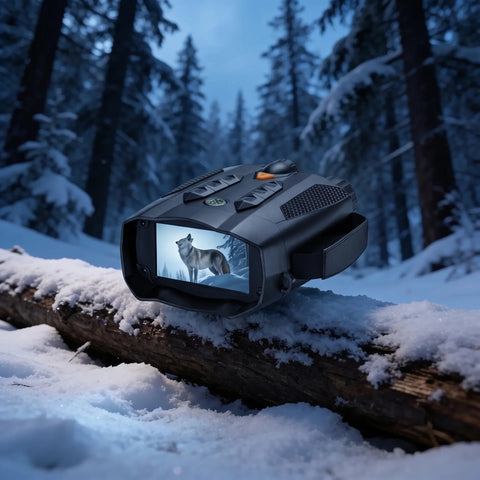
If your remote property also calls for occasional live observation on foot, for checking boundaries or spotting movement at dusk, a pair from the Night Vision Binoculars range complements a fixed camera nicely, giving you both an always-on record and a way to look closer in the moment.
Is a 4G camera right for your situation?
Choose 4G when the property is far enough that you cannot check it in person often, and when knowing sooner genuinely matters, for a holiday cabin, a piece of land, a stable block or an allotment. If you visit weekly and only want a record, the simpler offline or WiFi models in the trail camera collection may be all you need and cost less. The decision really comes down to one question: do you need to know now, or is it enough to find out on your next visit?
A quick word on ordering and support
SightForest ships across the EU. Products dispatch from our suppliers within around 48 hours, with tracked delivery typically taking 7 to 9 business days. Every camera carries a 3-year warranty, and there is a 30-day return window if it is not the right fit for your property.
A 4G trail camera turns a distant, hard-to-reach property into something you can glance at from your phone whenever you wonder how it is doing. Fit it with your own nano-SIM and a decent microSD card, place it thoughtfully across the main approach, and skip the monthly fees entirely. For an off-grid spot, pairing the cellular connection with solar charging is the closest thing to a camera you never have to think about again.
