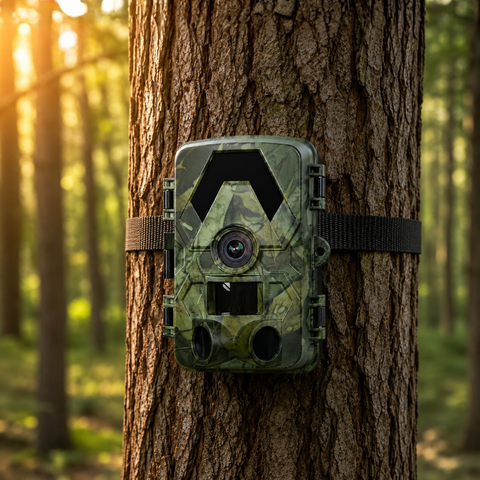

A cellular trail camera doesn't store photos and wait for you to walk in and swap the card — it sends them straight to your phone over the mobile network. The piece that makes that possible is the trail camera SIM card, the same kind of chip that connects a phone, paired with a data plan that pays for the images travelling across the network.
How a trail camera SIM card actually sends your photos
When the camera's PIR sensor detects movement, it fires the shutter, then hands the image to its built-in 4G modem. The modem uses the SIM card to log on to a mobile mast, exactly like a phone joining a call. From there the photo is uploaded to the maker's cloud or app server, which forwards it to your phone. The whole journey usually takes a few seconds once there is signal.
Three things have to line up for that to work: a valid SIM, mobile coverage at the camera's location, and an active data allowance. Miss any one and the camera will still take pictures — it just can't deliver them until the connection is back.
What the SIM card and data plan each do
- The SIM card identifies the camera to the network and unlocks access to it. It is the camera's "phone number" on the system.
- The data plan pays for the megabytes those photos and videos use as they upload. Photos are light; video is far heavier, so a plan sized for stills will burn through quickly if you switch to clips.
- Coverage is the mast signal in that exact spot. A field with a strong signal at the gate can drop to nothing 200m into the treeline.
Dual-SIM auto-switching: why two networks beat one
No single network covers every wood, ridge and valley. That's the case for dual-SIM. Our 4G Solar Trail Camera 4K carries two SIMs and switches automatically to whichever network has the stronger signal at that location. If one carrier is weak under the canopy, the camera leans on the other rather than going silent. For remote permissions where coverage is patchy, that auto-switching is often the difference between a camera that reports in and one that goes dark for a week.
Photo data versus video data
This is where most people get caught out. A single still image is a small file. A video clip — especially in 4K — can be many times larger, so it uses far more of your data allowance and more battery to upload. A sensible setup is to have the camera send small preview thumbnails or photos for routine triggers, then pull the full-resolution video on demand only when a thumbnail shows something worth keeping. That keeps the monthly data — and the upload load on the battery — under control.
| Setting | Data per trigger | Best for |
|---|---|---|
| Photo / thumbnail send | Low | Daily monitoring, long battery life, tight data plans |
| Full video send | High | Confirming behaviour or species when you already know it matters |
Batching and compression: keeping your trail camera SIM card data in check
Sending every photo the instant it's taken wakes the modem constantly, which drains battery and can chew through data on a busy trail. Most cellular cameras let you reduce that two ways:
- Batching: the camera stores triggers and uploads them on a schedule — say a bundle every hour — instead of one connection per image. Fewer modem wake-ups means less power used and tidier delivery.
- Compression: the camera sends a smaller, compressed version of the image over the network while the full-resolution original stays on the microSD card. You get a clear preview on your phone fast, and the pristine file is waiting on the card when you next visit.
Because that full-quality original lives on the card, a roomy, reliable card matters. A 128GB SD card gives the camera plenty of room to keep originals between trips even when it's only sending compressed previews.
How to check coverage before you mount the camera
Don't assume the spot works — test it. The simplest field check is to stand at the exact mounting position and look at the signal bars on your own phone, ideally on the same network as the SIM you plan to use. If your phone struggles there, the camera will too. A few practical tips:
- Test at the camera's real height and angle, not just at head height by the path.
- Check after leaf-out — summer canopy can cut signal that was fine in winter.
- If signal is marginal, a dual-SIM model gives you a second network to fall back on, and mounting a little higher or clearing a sightline toward the nearest mast can help.
For a wider look at how cellular delivery stacks up against the alternative, our guide on cellular vs WiFi trail cameras walks through where each one earns its place.
What if there's no signal — or you don't want a SIM at all?
Some locations simply have no usable mobile coverage, and some users would rather avoid a data plan entirely. In that case a WiFi camera is the answer: the 4G+ / WiFi Trail Camera connects over your phone's app on local WiFi with no SIM needed, and runs up to 12 months on a battery. You won't get images pushed to you from a remote wood, but for a garden, yard or any spot within WiFi range it removes the SIM and data question altogether.
FAQ
Do I need a special SIM card for a 4G trail camera?
You need a standard data-capable SIM on a network that covers the camera's location. The key is coverage and an active data allowance at that spot, not a particular brand of SIM. A dual-SIM camera lets you hedge across two networks for patchy ground.
How much data does a cellular trail camera use?
It depends almost entirely on whether you send photos or video. Stills and compressed thumbnails are light, so a modest plan covers a lot of triggers. Full-resolution video is many times heavier, so reserve on-demand video for clips that genuinely matter and let batching and compression handle the routine sends.
Will the camera still take photos if it loses signal?
Yes. The camera keeps capturing and saving images to its microSD card whether or not it can connect. Once signal and data return, it can upload what it missed, and the full-quality originals are always on the card waiting for you.
Can I use a 4G trail camera without a SIM card?
Not for cellular sending — the SIM is what puts it on the network. If you'd rather skip SIMs and data plans, choose a WiFi model that uses your phone's app over local WiFi instead.
If you're still weighing which cellular model and setup suits your ground, start with our pillar guide on how to choose a 4G trail camera, then browse the full range in our trail cameras collection.
