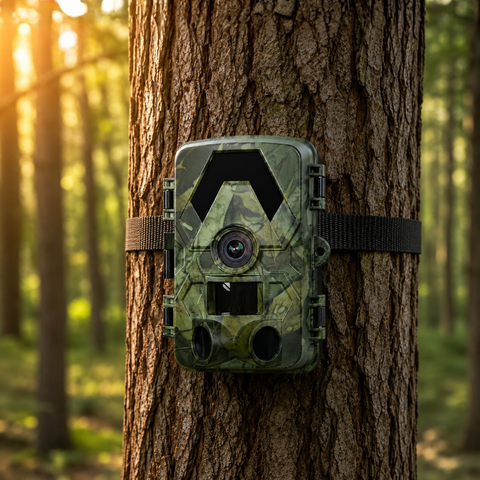

Nothing is more frustrating than checking your trail camera after two weeks in the woods and finding it went dark on day four. The culprit is almost always the batteries. Choosing the right cells is the single cheapest way to stretch your camera's runtime from days into months, and the difference between AA alkaline and lithium can be dramatic once temperatures drop.
This guide breaks down the real-world battery options for wildlife cameras, why they behave so differently outdoors, and how to squeeze the most life out of every set.
The three battery types you'll actually use
Most trail cameras, including the four models in our trail camera collection, run on standard AA cells. But "AA" describes a size, not a chemistry, and the chemistry is what matters. Here are the three you'll encounter:
- Alkaline AA — the cheap, everywhere-available default. Fine for a quick test in the garden, but a poor choice for long deployments. Alkaline cells lose capacity fast in the cold and can leak inside the battery tray if left too long.
- Lithium AA (Li-FeS2) — non-rechargeable lithium cells such as the Energizer Ultimate Lithium. These are the gold standard for trail cameras: far higher capacity, much lighter, and they barely notice sub-zero weather. They cost more up front but often last several times longer than alkaline.
- Rechargeable NiMH AA — the economical long-term choice if you service your camera regularly. Good capacity and reusable hundreds of times, though they self-discharge slowly and lose punch in deep cold. Choose low-self-discharge (LSD) types like Eneloop.
A quick word on what not to do: never mix chemistries or mix old and new cells in the same tray. The camera draws them down unevenly, which shortens runtime and raises the risk of leaks. Always replace a full set at once.
Why lithium wins in the field
The gap between alkaline and lithium comes down to two things: energy density and cold tolerance.
Lithium AA cells simply store more usable energy, so a single set powers many more photos, videos and night triggers before running flat. That energy advantage widens the harder the camera works, which is exactly what happens in busy locations where the PIR sensor fires constantly and the no-glow infrared LEDs fire at night.
Temperature is where lithium really pulls ahead. Alkaline chemistry struggles below freezing, sometimes losing more than half its usable capacity on a cold winter night, which is why a camera that seemed fine in autumn suddenly dies in December. Lithium cells keep delivering steady voltage down to around -40 degrees C. For anyone monitoring wildlife through a European winter, that reliability alone justifies the extra cost.
Lithium also weighs noticeably less and resists leaking, so it's kinder to your camera's contacts over long, unattended deployments. If you only remember one thing from this guide: for cold weather and long stints, use lithium AA.
What drains your batteries fastest
Battery choice sets the ceiling, but how you configure the camera decides how quickly you hit it. The biggest power draws are night-time infrared and video. Every night trigger fires the IR array, and video clips consume far more energy than a single still. To make any set of batteries last longer:
- Prefer photos over video where you can, or keep video clips short (10 to 15 seconds).
- Raise the PIR delay so the camera isn't re-triggering every few seconds on the same animal or on windblown grass.
- Aim away from busy backgrounds like swaying branches and roads, which cause constant false triggers that burn power for nothing.
- Use a fast, reliable microSD card. A slow or failing card makes the camera work harder and stay awake longer. A quality 128GB microSD card handles 4K UHD footage smoothly, and our cameras support cards up to 128GB.
- Check placement in cold months and lean on lithium cells when frost is likely.
Connectivity also matters. An offline SD-style camera that just writes to the card is the most frugal, because it never has to power a radio. WiFi and 4G models do more work, since they wake up to transfer images. On a cellular camera, remember it uses your own standard nano-SIM (not included, and not an eSIM) to send photos, and with SightForest there's no monthly subscription attached to that. The trade-off is convenience versus runtime, not a hidden running cost.
Matching batteries to your setup
How you power the camera should follow how you use it:
- Short tests and easy-to-reach spots — NiMH rechargeables keep costs down when you can swap them often.
- Remote, long-term or winter deployments — lithium AA every time, for the runtime and cold tolerance.
- Truly set-and-forget monitoring — consider removing the battery question almost entirely. Our 4G Solar Trail Camera 4K tops itself up from daylight, so the internal cells stay charged through long unattended stretches while it sends images over your own nano-SIM.
Whichever camera you run, the specs that drain power stay the same across the range: 4K UHD capture, 60MP stills, no-glow infrared to roughly 20 metres, a PIR trigger and IP66 weather sealing. Feed that hardware good cells and it will reward you with weeks or months of unattended coverage.
The bottom line
For most people, the answer is simple: use lithium AA for any deployment that matters, especially in cold weather or hard-to-reach spots, and keep NiMH rechargeables for short local tests. Never mix cell types, replace the whole set at once, and tune your camera's settings to avoid needless triggers. Do that, and battery anxiety becomes a thing of the past, leaving you to focus on the wildlife rather than the wiring.
