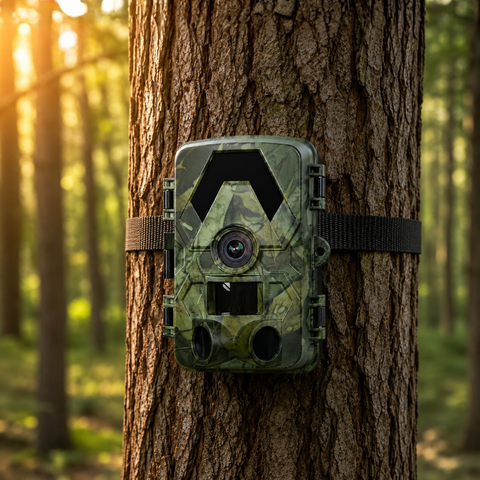

Construction sites are a magnet for theft and trespass: expensive plant, copper cabling, fuel and materials sit exposed overnight and across weekends, often with no mains power and no permanent CCTV in place. Trail cameras — originally built to watch wildlife in harsh outdoor conditions — turn out to be an ideal, low-cost way to monitor a site before, during and between phases of a build. This guide explains how they work for security and how to choose the right model for a plot with no power and no fixed internet.
Why trail cameras suit building sites
A trail camera is designed to sit outdoors for months, run on batteries and fire the moment something moves. Those same qualities make it far more practical than traditional CCTV on a temporary or half-finished site. There is no cabling to run, no NVR box to protect, and nothing that stops working the day the site power is cut over.
The features that matter most for construction security are the ones trail cameras already do well:
- PIR motion trigger — the camera stays dormant to save battery and only records when a person or vehicle enters the detection zone, so you review events rather than hours of empty footage.
- No-glow night vision — invisible infrared illuminates the scene to roughly 20 m in total darkness without a visible red glow that would tip off an intruder.
- 4K UHD video and 60MP stills — enough detail to make out faces, number plates and clothing, which matters if footage is ever handed to insurers or police.
- IP66 weatherproofing — rated to shrug off rain, dust and site grime through a full winter.
- Wide 112–130° field of view — a single unit can cover a gate, a compound corner or a materials laydown area.
Because each camera is small and self-contained, you can move units around as the build progresses — watching the perimeter during groundworks, then the plant compound, then the finished units before handover.
Choosing the right camera for your site
The main decision is how you want to receive footage, and that depends entirely on whether your site has power and connectivity. All four SightForest models shoot the same 4K UHD footage; they differ in how they get it to you.
Offline sites: record to card
If the site is remote or you simply want a black-box record to pull each week, the SD Trail Camera 4K writes everything to a microSD card with no network at all. It is the simplest and cheapest option (€99.99), and it cannot be jammed or hacked because it is completely offline. Pair it with a high-capacity 128GB microSD card so it can store weeks of clips between visits.
Sites with a cabin or Wi-Fi
Where there is a site office or nearby Wi-Fi, the WiFi Trail Camera 4K lets you pull footage to your phone on-site without unmounting the camera or removing the card — useful for a quick daily check before you leave.
Remote sites needing instant alerts
For unmanned plots where you need to know the moment someone arrives, a cellular camera is the answer. The 4G Trail Camera 4K sends photo alerts straight to your phone over the mobile network, so a foreman 30 km away can respond in real time. It uses your own standard nano-SIM (not included) — a normal data SIM from any carrier, not an eSIM — so you stay in full control of the data plan.
On a long build with no mains power at all, the 4G Solar Trail Camera 4K adds an integrated solar panel so the battery keeps itself topped up across months of deployment without site visits to swap cells.
No subscription, ever
This is where trail cameras separate themselves from most "smart" security systems. Many cellular security cameras lock cloud storage, alerts or even basic playback behind a monthly fee that quietly adds up across a fleet of units and a multi-year project. SightForest cameras carry no monthly subscription of any kind. With the 4G models your only running cost is the pay-as-you-go or contract data on the standard nano-SIM you choose. Footage lives on the microSD card and comes to your phone directly — you are never renting access to your own recordings.
For a site manager budgeting a job, that means the camera is a one-off purchase, not an open-ended operating cost that scales with the number of units on site.
Practical deployment tips
- Mount high and angled down — 2.5–3 m up a post or scaffold puts the lens out of easy reach and gives a clean view of faces rather than the tops of heads.
- Cover the choke points — gates, the compound entrance and the fuel or tool store deliver more useful footage than a wide view of open ground.
- Use a locking enclosure or strap where theft of the camera itself is a risk, and site more than one unit so they cover each other.
- Keep spares on card — a 128GB microSD holds a long run of 4K clips, so you rarely lose events between visits.
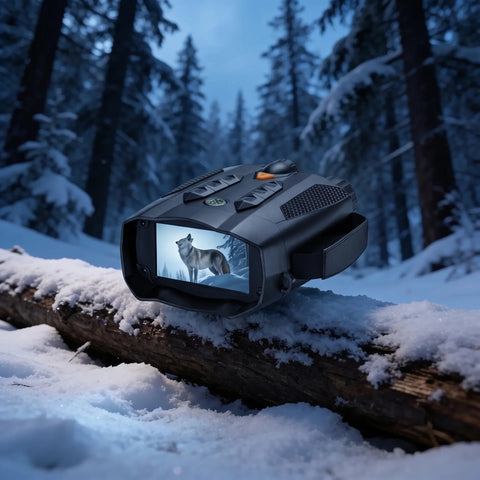
- For long-range checks after dark, a pair of night vision binoculars lets a night watchman scan the perimeter without relying on site lighting.
The bottom line
Trail cameras give construction sites rugged, weatherproof, no-power monitoring with 4K detail and instant cellular alerts — without the cabling of fixed CCTV or the recurring fees of subscription systems. Match the model to your site: SD for a simple offline record, WiFi where there's a cabin, and 4G or 4G Solar for remote plots that need real-time alerts. Every SightForest camera dispatches within about 48 hours with tracked delivery in 7–9 business days, and is covered by a 3-year warranty and 30-day returns. Browse the full trail camera collection to spec the right units for your next site.
